
Time sheet have always been around us. Some of us have been using it in a religious manner. But do we need it?
Time tracking among the corporate houses is done through state-of-the-art software. We, mortals, will not be able to afford them, until we become one of the big media houses. Amen to that!
Do we need time sheets?
Some freelancers prefer quoting a ball park figure for their work, and some charge on an hourly basis. An hourly rate has always brought upon a debate. The seasoned freelancer will always finish the work early than the amateur. And will face the hammering of the client for being pricey. The debate continues…
In any case, time tracking come handy to keep a track, so that we do not surpass our estimates. For example, if we have quoted considering a work of 10 hours, we need a tracker to keep us aware of the time spent. Failing which would mean the cost for the project is more than the pay.
Tools available
There are many tools available for us, many of them are at a premium. Some tools are too sophisticated, which shadows the main purpose of time sheet. It is good to choose a time sheet which fulfills the core purpose.
Of the many tools, we would like to suggest Toggl.com
One-click time tracking.
With Toggl you track time in real time. You never lose a minute of your billable time. If you forget to switch it on, then enter time later on. Organize your time by projects or tags, and mark it as “billable.”
Toggl is built for teams. Your entire staff will be set up and running in minutes. It’s as easy as Twitter – no training required. Start out simple, and drill deeper with user rights and project setup later on.
Get an instant overview of your billable time and team progress. Export time sheets. E-mail (or print) professional reports to customers or bosses.
Your time entries get synced in real time. Offline support keeps you toggling even when out of Wifi or mobile coverage areas. Hit the button on your iPhone and the timer starts on your computer. That simple. Oh, and Toggl plays well with your Trello, Asana or other favorite productivity tool.
Do give it a spin, if you feel the extreme need for one.
Still in thoughts?
In case you are still wondering about using them, you can download a simple app we made for you using the email box.
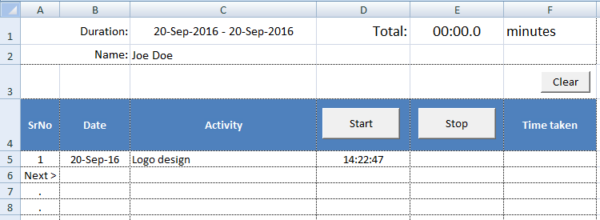
Simple Time Sheet using MS Excel
It runs on Excel VBA, so you need to enable macros on your MS Excel.
Do let us know your thoughts on this. We are eager to hear all.